
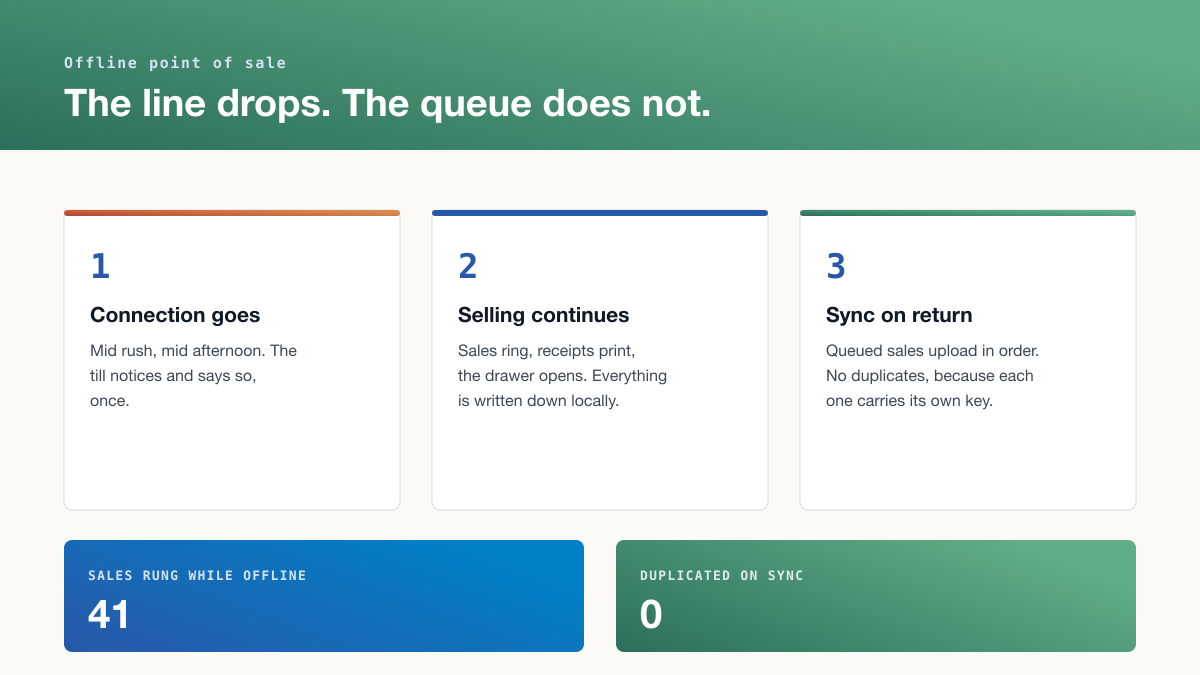
It is Saturday evening, there are eleven people in the queue, and the internet goes. If your till is a web page that needs a connection, you have just stopped trading with a shop full of customers holding things they want to buy.
This is not a rare event in Pakistan, and it is the single most useful question to ask before buying a point of sale.
The problem: cloud tills stop at exactly the wrong moment
Most modern POS systems are a browser talking to a server. That is a good design until the link breaks, and links break during load shedding, during rain, and during the exact busy hours when the local tower is congested.
The usual workarounds are worse than the problem. Writing sales on paper to enter later means an evening of typing and a stock count that is wrong all day. Turning customers away is the most expensive option available.
A till that keeps ringing is not a luxury feature here. The hard part is not selling offline, it is coming back cleanly.
Why "syncs later" is not enough on its own
The dangerous moment is the reconnection. A naive queue re-sends everything it holds, and if part of a batch reached the server before the connection dropped, those sales arrive twice. Now stock is deducted twice, the day's takings are inflated, and somebody spends an evening finding it.
The fix is that each sale carries its own key, generated at the till when the sale happens. The server accepts a key once. Send the same sale five times and it lands once. That is what makes 41 offline sales sync as 41 rather than 60.
Ask any vendor this specific question: what happens if the same offline sale is sent twice? A vague answer means you will find out yourself, at month end.
Closing the day honestly
Once the till knows how each sale was paid for, the end of day stops being an argument.
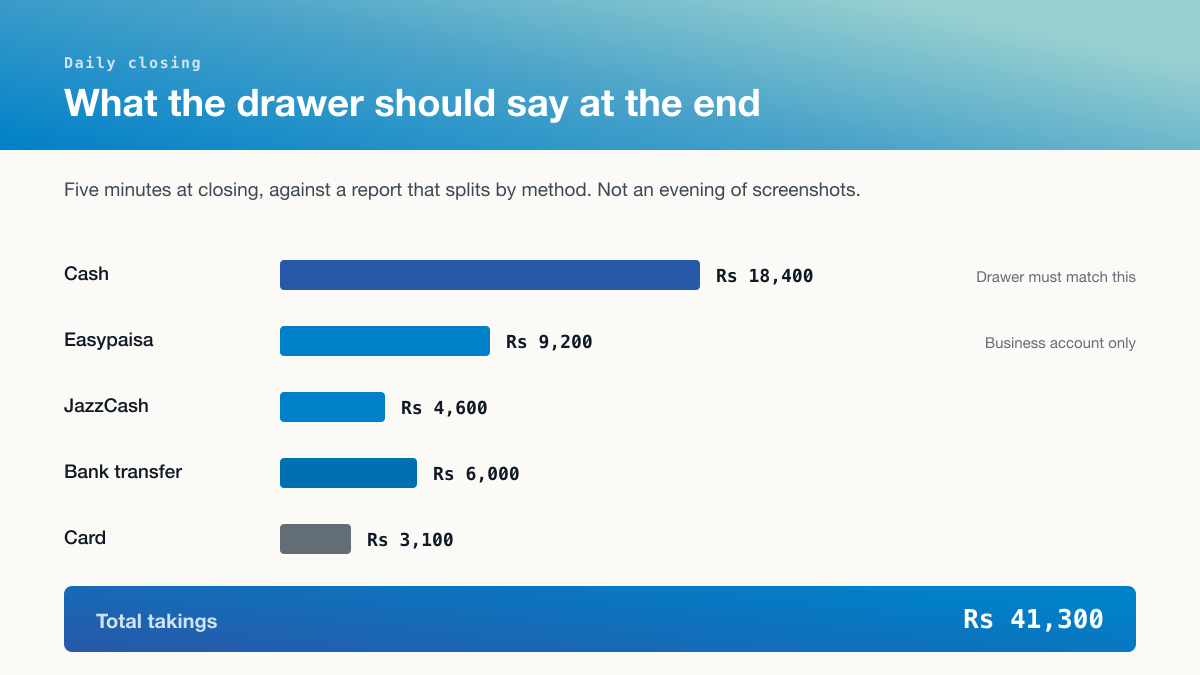
The cash line is the only one that has to match physical notes in a drawer. Everything else is checked against an account. Five minutes, not an evening of screenshots, and a discrepancy found the same night is traceable to a specific sale.
And when the drawer is short
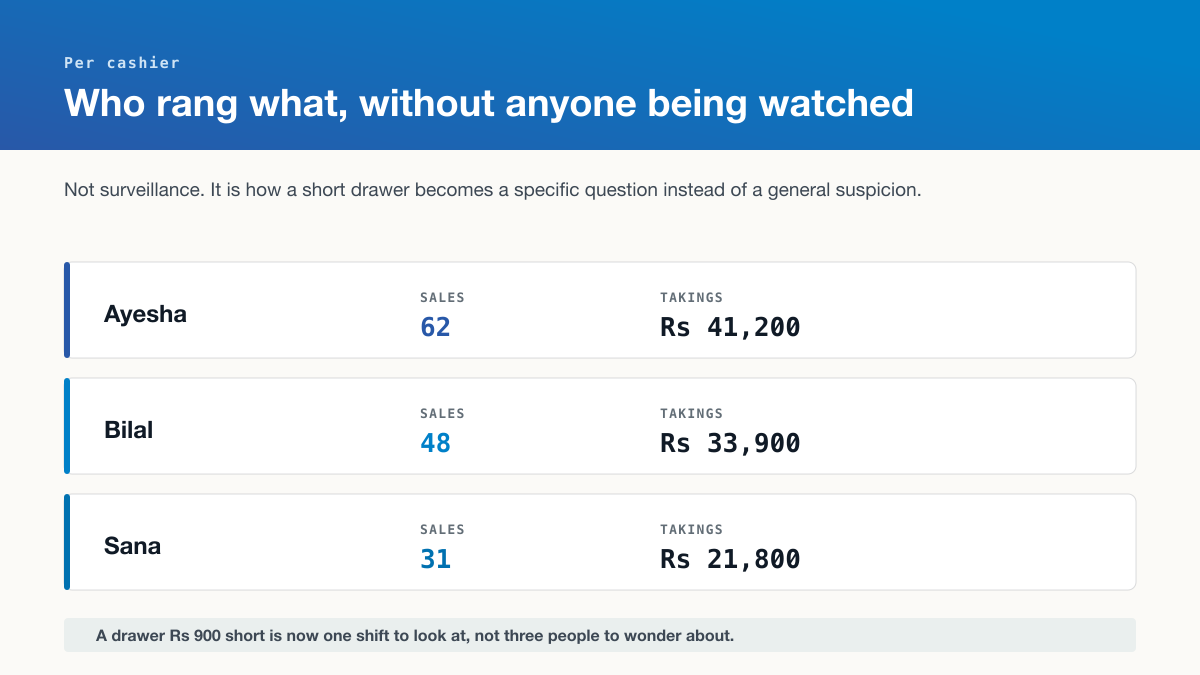
This is not surveillance and should not be presented as such. It is how a drawer that is Rs 900 short becomes one shift to look at rather than three people to quietly wonder about. Most shortfalls turn out to be a wrong change calculation or a sale rung twice, and both are findable in a minute when you know which till and which hour.
Tips and tricks
Test the offline mode before you go live, not after. Turn the wifi off mid-sale on a quiet Tuesday and watch what happens. If nobody at the vendor will tell you how to test this, that is your answer.
Give the till its own connection if you can. A cheap dedicated mobile data SIM for the counter is worth more than most software features.
Print the receipt from the till, not the cloud. A receipt that needs a server is another thing that stops when the line does.
Reconcile daily, never monthly. A gap found tonight has a cause. The same gap found on the 30th is just a smaller profit.
Use a business account for digital payments. Payments into a personal account cannot be reconciled against takings without manual work forever.
Watch the payment mix month on month. When app payments climb and your cash handling has not changed, you are paying for two systems at once.
Where this sits
This is the last step of the chain. The goods were ordered before the rate was known, checked properly at the door, and kept on one stock number across every channel. The till is where all of that either holds up or quietly falls apart.