
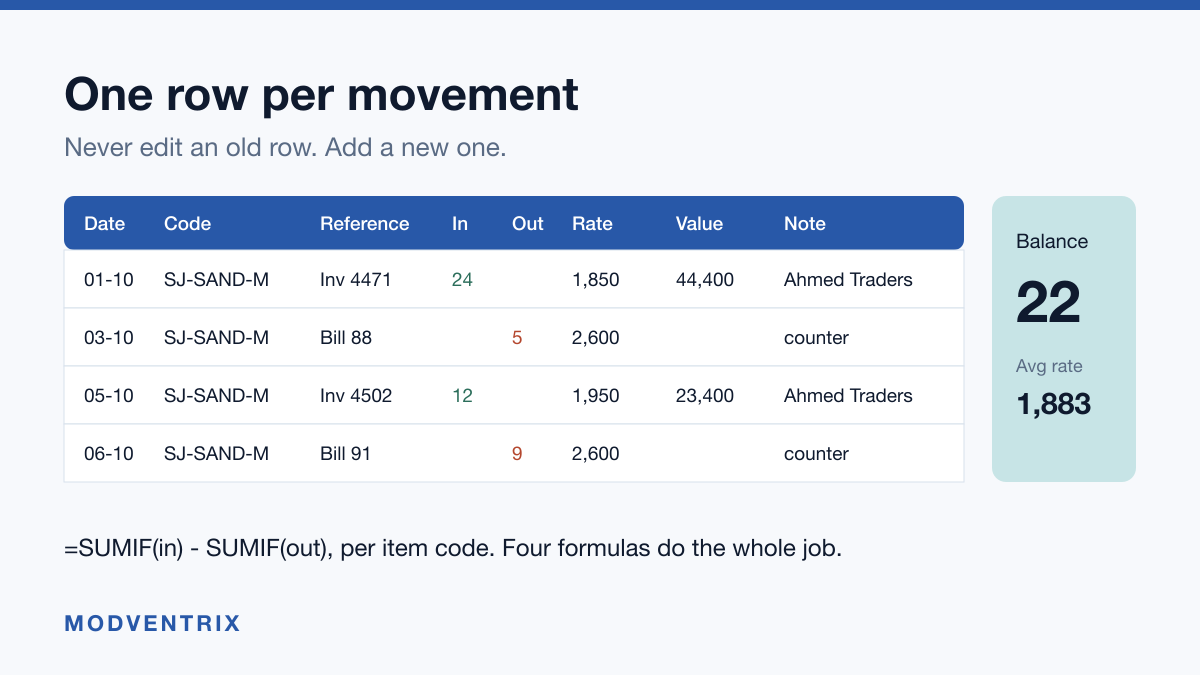
Short answer: a working stock register needs eight columns, one row per movement, and four formulas. Date, item, batch or reference, in quantity, out quantity, running balance, rate and value. Every stock movement gets its own row. Never edit an old row to fix a count, add a new one, because the history is the only thing that tells you where a mistake entered.
That is the whole format. Below is how to build it, and what to watch.
The column layout
Build one sheet called Movements and one called Items. Resist putting
everything on one tab, because the moment you need a second sheet you will be
retyping product names, and typos are the single commonest cause of a stock
register that no longer adds up.
Items holds one row per product:
| Column | Example |
|---|---|
Code | SJ-SAND-M |
Name | Site Jacket, Sand, M |
Unit | piece |
Reorder level | 6 |
Movements holds one row per movement, newest at the bottom:
| Column | Example |
|---|---|
Date | 08-10-2026 |
Code | SJ-SAND-M |
Reference | Invoice 4471, or Bill 88 |
In | 24 |
Out | |
Rate | 1,850 |
Value | 44,400 |
Note | from Ahmed Traders |
One row, one movement. A purchase is a row with a number in In. A sale is a
row with a number in Out. A return is a row too, not an edit of the original.
The four formulas
Current stock of one item. Put the item code in a cell, say H1, and:
=SUMIF(Movements!B:B, H1, Movements!D:D) - SUMIF(Movements!B:B, H1, Movements!E:E)
Total in, minus total out. This is the number you are actually keeping the register for.
Stock of every item at once. On a summary tab, with codes down column A:
=SUMIF(Movements!$B:$B, $A2, Movements!$D:$D) - SUMIF(Movements!$B:$B, $A2, Movements!$E:$E)
Fill it down. The dollar signs matter: without them the ranges slide as you copy and the numbers quietly become nonsense.
Value of stock on hand. Weighted average cost, which is the honest version when you buy the same item at different rates:
=SUMIFS(Movements!G:G, Movements!B:B, $A2, Movements!D:D, ">0") / SUMIFS(Movements!D:D, Movements!B:B, $A2, Movements!D:D, ">0")
That gives average purchase rate. Multiply by current stock for value on hand.
Items at or below reorder level. On the summary tab, where B2 is current
stock and C2 is the reorder level from Items:
=IF(B2<=C2, "ORDER", "")
Filter that column for ORDER once a week and you have a purchase list that is
based on what actually moved rather than what you remember moving.
Two rules that save more trouble than any formula. Turn on data validation
on the Code column in Movements, pointing at the Items list, so nobody can
type a product that does not exist. And lock the formula cells, because the
most common corruption of a stock sheet is someone typing a number over a
formula to make a total look right.
Keeping a register by hand instead
If you keep a paper register, the same eight columns apply, with one addition: number every page and never tear one out. The purpose of a stock register is not the current count, which you could get by walking the shelf. It is the trail that tells you when a number went wrong and who was standing there.
For a register in Urdu, keep the column headings in whichever language your staff actually reads, but keep the item codes in English and in exactly the same form every time. Codes are what let you search later. Names in mixed script with inconsistent spelling are not searchable, and that single inconsistency is what makes most hand-kept registers unusable after a year.
Where this breaks
A spreadsheet is free, instant and understood by everyone in the shop. It breaks in three specific places, and it is worth knowing which one you have reached rather than being told software is always better.
Two people, one file. The moment a second person needs it, you are managing versions rather than stock. Somebody works from a copy, both get edited, and the number everyone trusts is now the number nobody can vouch for. Shared cloud sheets help with the file and not with the habit: two people still enter the same sale twice on a busy day.
Selling in more than one place. A counter, an online store and WhatsApp orders means three views of one number. The sheet can only ever be one of them, so the other two are wrong between updates. This is the one that costs real money, because the last piece gets sold twice and somebody is getting a refund and an apology.
The person who built it leaves. Every mature stock sheet contains at least one formula nobody else understands and at least one manual step that lives only in one person's head. When they go, the sheet keeps producing numbers, and that is the dangerous part: it looks like it is still working.
If none of those three has happened to you, your spreadsheet is doing its job and you should keep it. We publish a longer version of this test, six moments rather than three, if you want to check where you stand before spending anything.
The practical test
Pick a fast-moving item. Count it on the shelf right now. Open your register and read the balance for the same item.
If the two numbers match, your process is working and the format above will make it faster. If they do not, the question is not which software to buy. It is where the gap entered, and the only thing that can answer that is a complete movement history where nobody ever edited an old row.